AI Prompts for Creating Suspense Movie Scenes
Suspense depends heavily on atmosphere.
Artificial intelligence is changing how independent filmmakers create horror movies, short films and cinematic trailers. With the right prompts, creators can generate frightening environments, mysterious characters and suspenseful scenes without needing to build expensive sets or travel to remote locations.
However, creating a convincing horror scene requires more than typing a few words such as “a scary house” or “a ghost in the forest.” The secret is to describe exactly what the audience should see, how the camera should move and what emotions the scene should create.
By combining detailed descriptions, lighting, camera techniques and atmosphere, filmmakers can use AI tools to develop more immersive cinematic scenes.
1. Why Detailed Prompts Matter in AI Filmmaking
AI image and video generators interpret written instructions to create visual content. When a prompt is too general, the result may not match the filmmaker’s expectations.
For example, a prompt that says “an abandoned house at night” leaves many creative decisions undefined. The AI must determine the building’s appearance, its surroundings, the lighting, the camera angle and the overall atmosphere.
A detailed prompt gives the system more guidance. You can specify broken windows, decaying wooden doors, overgrown vegetation, moonlight, atmospheric fog and deep shadows. These details help establish the visual identity of the scene.
The goal is not simply to make the image look frightening. It is to create a believable environment that supports the story and encourages the audience to wonder what might happen next.
2. Creating a Realistic AI Horror Image

An effective horror image prompt should describe the location, visible objects, lighting, atmosphere, camera composition and visual style.
Example image prompt
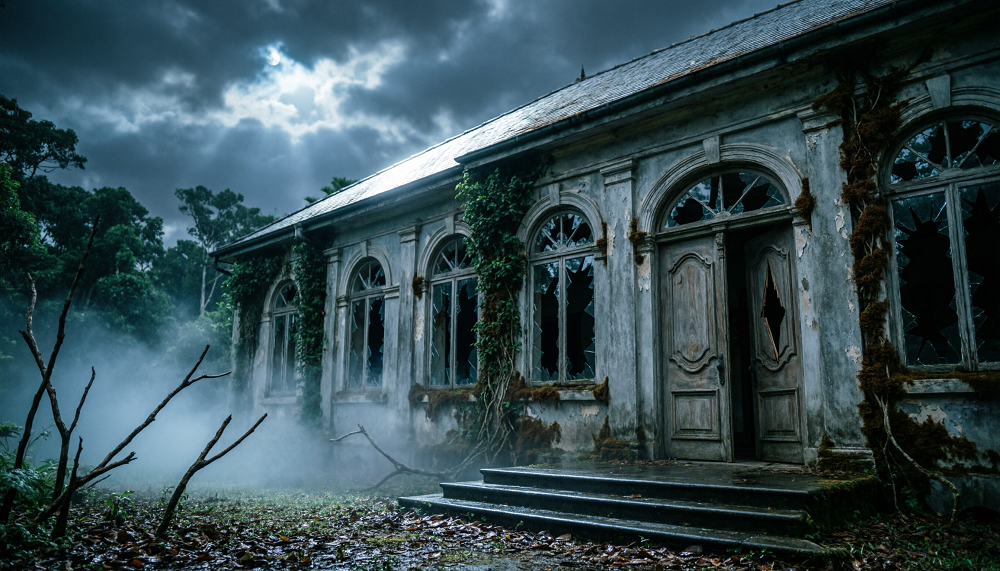
An abandoned mansion deep inside a Nigerian forest at midnight, broken windows, old wooden doors, overgrown tropical plants covering the walls, faint moonlight shining through dark clouds, thick mist surrounding the building, twisted tree branches framing the foreground, a mysterious human silhouette visible behind an upstairs window, cinematic horror photography, realistic textures, dramatic shadows, cold blue color palette, wide establishing shot, highly detailed environment.
Notice how the prompt describes specific visual details rather than relying on the word “scary.” The broken windows suggest neglect, the mist creates uncertainty, and the silhouette introduces a mystery without revealing too much.
The same approach can be adapted to other settings, including abandoned hospitals, deserted villages, old family compounds and isolated roads.
3. Turning the Image Into an AI Video Scene
A cinematic image captures a single moment, but video introduces movement, timing and suspense. When writing a video prompt, describe what the character does, how the camera moves and how the situation develops.
Example video prompt
A young Nigerian man slowly approaches an abandoned mansion in the middle of the night. The camera follows him from behind as he walks carefully along a narrow path through thick mist. His footsteps disturb the wet leaves beneath his shoes. He stops at the entrance and looks toward a second-floor window where a faint human shadow suddenly appears. He freezes in fear as the camera slowly pushes closer to his face. Moonlight illuminates the decaying building, atmospheric fog drifts across the entrance, realistic character movement, suspenseful pacing, cinematic horror lighting, realistic African horror film.
This prompt gives the video generator a sequence of actions rather than a static description. The character approaches, stops, notices something and reacts.
For better results, keep the scene relatively short and avoid describing too many complicated actions in a single generation. You can create additional clips for the character entering the house, exploring a dark corridor or hearing an unexplained sound.
4. Using Camera Movement to Build Suspense
Camera movement plays an important role in horror filmmaking because it controls what the audience sees and when they see it.
A slow tracking shot following a character from behind can make viewers feel as though something is watching them. A close-up of a frightened face can communicate fear without dialogue. A slow push toward a dark doorway can build anticipation by suggesting that something may be waiting inside.
Wide establishing shots are useful for showing how isolated a location is. Low-angle shots can make a building appear imposing, while over-the-shoulder shots can direct attention toward something the character has noticed.
When writing prompts, use clear camera instructions such as “slow tracking shot from behind,” “gradual push-in toward the face” or “wide establishing shot from a low angle.”
Remember that different AI video tools interpret camera instructions differently. Review the generated clips and keep the movements that support your story.
5. Maintaining Consistency Across Horror Movie Scenes
One common challenge in AI filmmaking is keeping characters consistent between shots. A character may have a different face, hairstyle or outfit in the next generated clip.
To reduce these changes, create a detailed character description before generating the movie. Record the character’s age, skin tone, hairstyle, clothing and other recognizable features.
Reuse the same description whenever the character appears. If your video generator supports reference images, use an approved character image to guide subsequent generations.
Consistency also applies to the environment. If a mansion has a large wooden entrance and a broken upstairs window in the opening scene, try to preserve these features in later shots.
6. Combining AI Shots Into a Complete Horror Trailer
A compelling trailer usually contains several different shots rather than one long scene. Begin with a wide view of the abandoned mansion, introduce the character approaching it, show a mysterious shadow, and then cut to a frightening reaction.
Build tension gradually with sound effects such as distant thunder, footsteps, creaking doors and subtle background music. Silence can also be effective immediately before a sudden reveal.
Finally, edit the clips together using video-editing software. Adjust their timing, add transitions where appropriate, balance the audio and finish with a title card that introduces the movie.
Conclusion
Creating realistic AI horror scenes depends on clear visual descriptions, deliberate camera movement and careful control of atmosphere. Instead of asking an AI tool to create something merely frightening, describe the environment, the character’s actions, the lighting and the emotional effect you want.
Start with a strong image prompt, develop it into a short video sequence, maintain character consistency and combine the best clips through editing. With practice, this structured approach can help independent filmmakers turn simple horror concepts into more convincing cinematic experiences.
Educational content only — not financial advice. Income and savings results vary and are never guaranteed. How we write
Enjoyed this story?
Get the best stories delivered weekly.