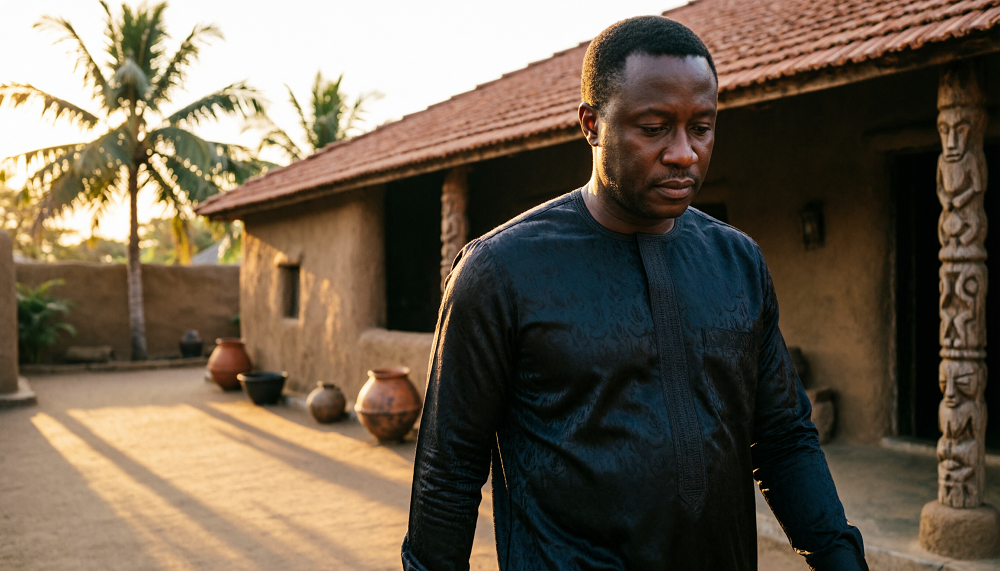
Create an AI Film Trailer With Powerful Prompts
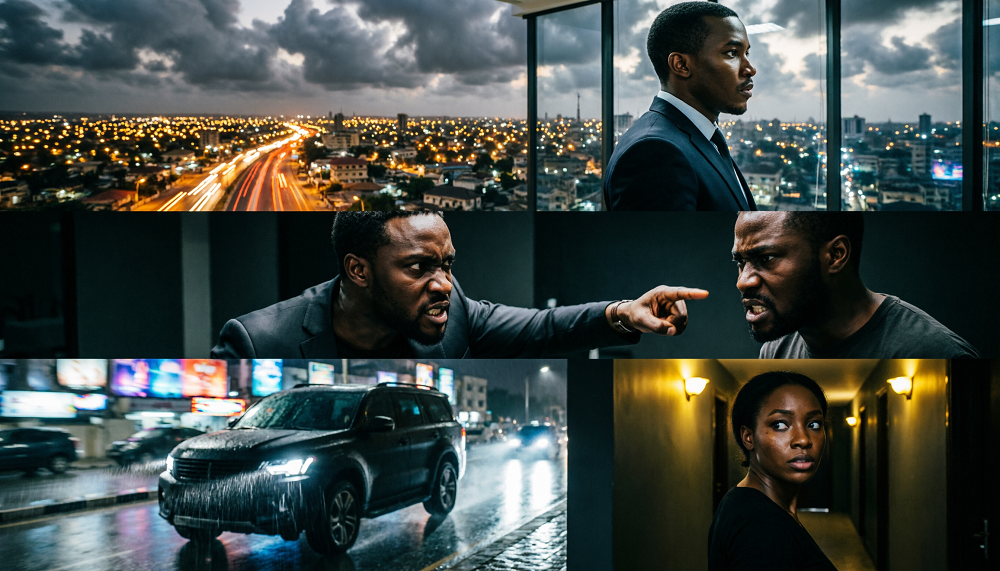
A compelling movie trailer needs more than beautiful images. It needs a sequence of shots that introduces the setting, establishes the main character, builds conflict, creates excitement and leaves the audience wanting to know what happens next.
AI filmmakers can achieve this by generating individual clips and assembling them into a trailer using video-editing software.
Shot 1 — Establishing Shot

Purpose: Introduce the location and atmosphere.
AI video prompt:
Aerial cinematic view of Lagos, Nigeria, at night, thousands of city lights illuminating the skyline, busy roads filled with moving vehicles, dramatic clouds above the city, slow aerial camera movement, realistic urban environment, suspenseful atmosphere, high-end African thriller cinematography, widescreen composition.
Shot 2 — Character Introduction

Purpose: Introduce the main character and suggest that something is troubling him.
AI video prompt:
A mysterious 40-year-old Nigerian businessman wearing a black traditional outfit stands alone inside a luxurious high-rise office overlooking Lagos at night. He stares through a large glass window, his reflection visible on the glass. The camera slowly moves toward him from behind before revealing part of his face. Dramatic side lighting, subtle body movement, tense atmosphere, realistic cinematic African drama.
Shot 3 — Conflict

Purpose: Create tension and make the audience wonder what has gone wrong.
AI video prompt:
Two Nigerian men confront each other inside a dark executive office at night. One man angrily points toward the other while the second man remains tense and refuses to look away. The camera cuts between close-ups of their faces, capturing anger, fear and distrust. Dramatic shadows, realistic facial expressions, restrained natural movements, intense cinematic thriller atmosphere.
Shot 4 — Action

Purpose: Increase the pace and excitement.
AI video prompt:
A black luxury SUV speeds along a rain-soaked Lagos street at night. Its headlights illuminate the falling rain while city lights reflect across the wet asphalt. The camera tracks the vehicle from a low side angle before moving behind it as it disappears into traffic. Dynamic but realistic vehicle movement, cinematic motion blur, dramatic lighting, high-tension African action thriller.
Shot 5 — Final Mystery

Purpose: End with a question that makes viewers want to watch the full movie.
AI video prompt:
A frightened Nigerian woman wearing an elegant dark blue dress stands alone in a dimly lit hallway. She hears an unexpected sound behind her and slowly turns her head toward the darkness. The camera gradually pushes closer to her face as her expression changes from confusion to fear. Deep shadows, subtle natural movement, suspenseful cinematic lighting, realistic African thriller, cut to black before the source of the sound is revealed.
How to Assemble the Trailer
1. Establish the world
0–4 seconds · Lagos skyline
2. Introduce the hero
4–8 seconds · Mysterious businessman
3. Build the conflict
8–12 seconds · Heated confrontation
4. Increase the tension
12–16 seconds · High-speed chase
5. Leave a mystery
16–20 seconds · Suspenseful ending
Add dramatic background music, carefully timed sound effects, short dialogue or voice-over, and a title card at the end.
However, a professional-looking trailer requires more than a collection of attractive AI-generated clips. Each shot must contribute to the story, build suspense, introduce important characters, and encourage viewers to watch the full movie.
The secret is to approach AI trailer production like a film director. Plan the scenes, control the visual style, reuse character references, and generate each shot separately.
1. Start With a Strong Trailer Concept
Before writing prompts, decide what your trailer should communicate. A trailer is not the entire movie. Its purpose is to introduce the main characters, establish the central conflict, create curiosity, and leave the audience wanting more.
For example, imagine a Nigerian drama about a wealthy businessman who discovers that the woman he plans to marry has been hiding a family secret.
The trailer might introduce the businessman in his luxurious Lagos home, show the woman receiving a mysterious phone call, reveal a tense confrontation, and end with an unexpected discovery.
Write a short summary of the story before generating any visuals. Identify the main character, the conflict, the emotional turning point, and the mystery that will keep viewers interested.
2. Break the Trailer Into Individual Shots
One common mistake is asking an AI video generator to create an entire trailer from one long prompt. Although some tools can generate longer sequences, they may struggle to maintain character consistency, control scene transitions, and follow a precise sequence of events.
Instead, divide the trailer into short, manageable shots.
For a 30-second trailer, you might use five to eight shots, depending on the length of each generated clip.
Example structure:
- Shot 1 — Opening: Establish the location and atmosphere.
- Shot 2 — Character introduction: Show the main character in their environment.
- Shot 3 — Conflict: Introduce a troubling event or unexpected discovery.
- Shot 4 — Rising tension: Show an argument, chase, emotional reaction, or confrontation.
- Shot 5 — Mystery: Reveal a clue without explaining everything.
- Shot 6 — Final hook: End with a shocking moment, dramatic line, or unanswered question.
- Title card: Display the movie title and release information.
You can rearrange these shots to suit your genre. An action trailer might open with danger, while a romantic drama could begin with a beautiful encounter before revealing the emotional conflict.
3. Create Character Reference Images First
Character consistency is essential when the same actors appear throughout a trailer. If the protagonist has a different face, hairstyle, or clothing in every shot, the trailer may feel like several unrelated videos.
Before generating the scenes, create a detailed character description and, where possible, a reference image.
For example:
Character reference prompt:
“Amara is a 30-year-old Nigerian woman with dark brown skin, an oval face, expressive brown eyes, shoulder-length natural black hair, small gold earrings, and a slim build. She wears a blue traditional Yoruba blouse and matching wrapper. Realistic facial proportions, natural skin texture, detailed eyes, neutral expression, cinematic portrait photography.”
Save the best result and reuse it whenever Amara appears. If the story requires different outfits, generate additional approved references while preserving her facial identity and other defining features.
Use the same method for the other important characters.
Professional tip: Reuse both the reference images and the written character descriptions. A written description alone may not be enough to maintain identity across different generations.
4. Write a Separate Prompt for Every Shot
Each shot should describe exactly what the audience needs to see. Include the character, action, location, time, lighting, camera movement, mood, and visual style.
For example, if you are creating a suspenseful Nigerian drama, you could use the following prompts.
Shot 1: Establishing shot
“Wide cinematic shot of a luxurious modern Lagos mansion at night, rain falling gently across the driveway, warm lights glowing through large windows, wet pavement reflecting the lights, slow camera push toward the entrance, mysterious atmosphere, photorealistic Nollywood thriller, realistic environmental details.”
Shot 2: Introduce the main character
“Amara, the same 30-year-old Nigerian woman shown in the approved character reference, wearing her blue traditional Yoruba blouse and matching wrapper, standing inside the mansion beside a large window. She looks worried while holding a mobile phone. Soft light illuminates her face, medium close-up, subtle camera movement, realistic emotional expression, cinematic Nigerian drama.”
Shot 3: Reveal the conflict
“Amara slowly looks down at her phone after reading a disturbing message. Her expression changes from confusion to shock. Her fingers tighten around the phone as she takes a quiet breath. Slow camera push toward her face, tense atmosphere, realistic human movement, consistent facial identity, cinematic lighting.”
Generate each shot independently, then arrange the strongest results in your video editor.
5. Use Camera Movement to Build Suspense
Camera movement helps control how the audience experiences a trailer.
A slow push-in can make a character’s reaction feel more intense. A wide tracking shot can reveal a large environment or follow someone running through a corridor. A close-up can highlight fear, sadness, or determination.
Choose camera movement according to the purpose of the shot.
For example:
- Use a wide shot to establish a mansion, village, palace, or city street.
- Use a close-up to reveal a character’s emotional reaction.
- Use a tracking shot for movement, pursuit, or escape.
- Use a slow push-in when revealing a secret or building tension.
- Use a steady shot during serious dialogue to keep attention on the characters.
Avoid requesting several complicated camera movements in a very short clip. Simple, controlled movement is often easier for AI video generators to interpret.
6. Control Lighting, Mood, and Visual Style
A trailer should feel like one film, even when its shots are generated separately.
Choose a consistent visual direction before production. For a realistic Nollywood thriller, you might use natural skin textures, cinematic contrast, practical lighting, realistic Nigerian locations, and restrained camera movement.
For a romantic film, softer lighting and warmer colors may work better. A historical Yoruba drama could use traditional architecture, period-appropriate costumes, palace courtyards, and lighting suited to the historical setting.
Repeat the most important visual instructions across your prompts. However, allow the lighting to change naturally when the story moves from day to night or from a peaceful scene to a dangerous one.
7. Add Dialogue, Music, and Sound Effects
Visuals alone may not create the emotional impact you want. Music, dialogue, silence, and sound effects help connect the shots.
A suspenseful trailer might begin with rain and distant thunder, introduce a low musical pulse as the mystery develops, and build toward a dramatic sound immediately before the title appears.
A romantic trailer might use gentle instrumental music before shifting to emotional dialogue.
If your AI video tool produces unreliable speech or lip synchronization, consider generating the visuals separately and adding dialogue or voice-over during editing.
Keep dialogue short and memorable. A single line such as “There is something I never told you” can create curiosity without revealing the entire story.
8. Edit the Shots Into a Complete Trailer
Once you have generated the clips, assemble them in a video editor. Remove weak or repetitive moments, arrange the scenes to build tension, and use transitions that match the story.
Add the movie title, music, dialogue, and sound effects. Check that the character’s appearance remains consistent and that the sequence makes sense when viewed from beginning to end.
Export the trailer in the aspect ratio suited to your audience. Widescreen formats work well for YouTube and traditional cinematic presentation, while vertical formats may be more suitable for TikTok, Instagram Reels, and YouTube Shorts.
The Most Important Professional Tip
Generate each shot separately instead of asking an AI video generator to create the entire trailer in one prompt.
Reuse the same character reference images and descriptions whenever characters return. This makes it easier to control continuity, pacing, camera movement, and visual style.
Remember the production workflow:
Story idea → Character references → Shot list → Individual prompts → Video generation → Editing → Sound design → Final trailer
AI filmmaking still requires creative decisions and careful review. Some generations will need to be repeated, and detailed prompts cannot guarantee perfect results. By planning the trailer shot by shot, you gain more control over the final production and can turn a simple story idea into a more coherent cinematic experience.
Educational content only — not financial advice. Income and savings results vary and are never guaranteed. How we write
Enjoyed this story?
Get the best stories delivered weekly.